
Browser Agents
Get run status and results
Retrieve a browser run, individual task outcomes, retry counts, and optional execution timelines.
GET
Get browser task status
Use the
id returned by task submission. A run is also called a batch in the API and SDK types.
Batch and task states
Batchstatus is processing, completed, or failed. Stop polling on either terminal state. A completed batch may contain unsuccessful tasks.
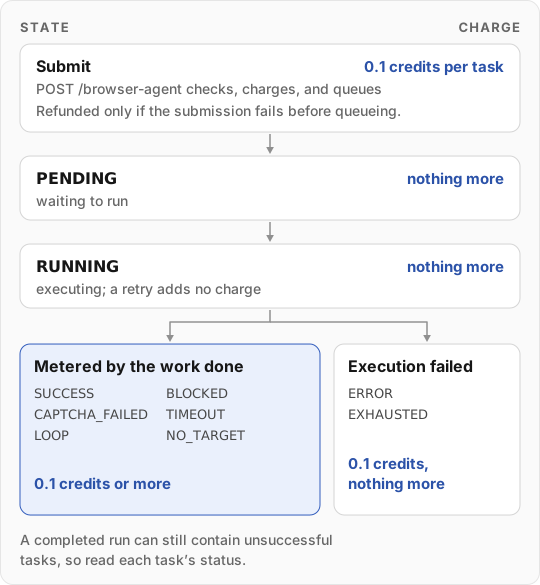
Every browser task is charged a 0.1-credit floor when you submit it, so you need available credits to start. When the task finishes, it is charged any usage above the floor, whether it succeeded or not. Only an
ERROR or EXHAUSTED task keeps the floor and nothing more.
In-progress results
results is aligned to task order. An entry can be a terminal result, a PENDING/RUNNING stub, or null when task details are unavailable. Pending entries need not include data, durationMs, or creditsUsed.
The detail response counts result slots in completed, including synthesized entries. Use status, not completed === total or array length, to decide whether the run is finished.
Additional fields can include:
Inspect task
status before using data. Treat display names, queue position, and timestamps as optional.
Event timeline
SetincludeEvents=true when you need execution evidence:
results[i].events contains available task events. liveEvents[i] can contain events for unfinished tasks; completed slots can be empty arrays. These fields can remain present after batch completion.
An event uses { type, timestamp, iteration?, data }, where timestamp is Unix time in milliseconds. Types include navigation, plan, action, screenshot, validation, done, error, and lifecycle events. Accept unfamiliar event types and inspect their payloads instead of assuming a closed list.
Screenshot payloads can contain inline image data rather than a URL. Events vary by execution path and are not guaranteed for every step. Timelines can be large, so omit them from routine status checks. The existing-run stream provides a snapshot followed by live updates.
Errors
Each status has an example body in the response examples. See errors and retries.
Authorizations
Your pre.dev workspace API key (pdk_...) from Integrations, Built-in tab: https://pre.dev/projects/integrations?tab=built-in
Path Parameters
24-character record ID.
Pattern:
^[a-fA-F0-9]{24}$Query Parameters
Response
Batch with available results and optional events.
24-character record ID.
Pattern:
^[a-fA-F0-9]{24}$Ordered by task index. Slots can be null or partial until a result arrives.
Available options:
processing, completed, failed Counts result slots, including pending/running placeholders or nulls. Do not use this as the completion signal.
Per-task events when includeEvents=true and live events are available.